

A .NET library for business documents.
PDF, DOCX, XLSX and HTML from one model.
Papyra is a .NET library that composes documents with a fluent API and can render them to four formats from the same model.
For PDF generation, it uses a hand-written PDF engine with veraPDF-verified PDF/A output, full Unicode font subsetting, and tables that paginate.
- .NET 10
- PDF/A-2b · 3b · 4
- No native code
The API
Describe the document once. Render it four times.
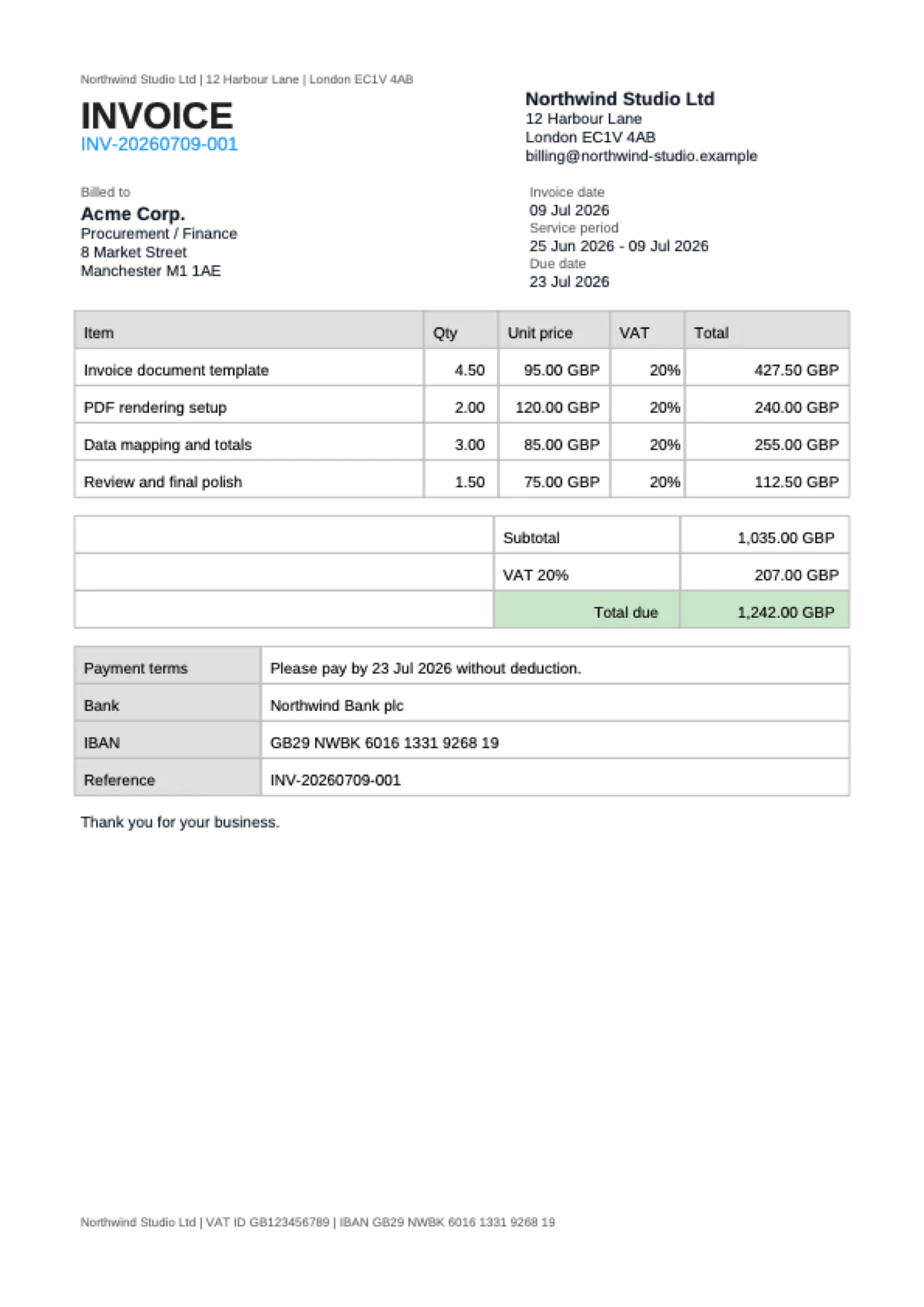
This is the exact composition behind the invoice above - one builder chain, no format-specific branches. The last four lines are the whole rendering story.
var document = Document.Create(doc => doc
    .PageSize(PageSize.A4)
    .Margin(new Thickness(48f))
    .Header(h => h.Text("Northwind Studio Ltd | 12 Harbour Lane | London EC1V 4AB", Small))
    .Footer(f => f.Text("Northwind Studio Ltd | VAT ID GB123456789", Small))
    .Row(row => row
        .RelativeItem(left => left
            .Text("INVOICE", Title)
            .Text("INV-20260709-001", new TextStyle(Color: Colors.Blue.Medium)))
        .RelativeItem(right => right
            .Text("Northwind Studio Ltd", Section)
            .Text("12 Harbour Lane", Body)))
    .Table(table =>
    {
        table.Columns(c => c.FixedColumn(225f).FixedColumn(48f)
            .FixedColumn(72f).FixedColumn(48f).RelativeColumn());
        table.Header(row => row
            .Cell("Item", TH).Cell("Qty", TH).Cell("Unit price", TH)
            .Cell("VAT", TH).Cell("Total", TH));
        foreach (var item in invoice.Items)
            table.Row(row => row
                .Cell(item.Description, Cell)
                .Cell(item.Quantity, Numeric)
                .Cell(item.UnitPrice, Numeric)
                .Cell(item.TaxRate, Numeric)
                .Cell(item.NetTotal, Numeric));
    }));

byte[] pdf  = document.RenderAsPdf();
byte[] docx = document.RenderAsDocx();
byte[] xlsx = document.RenderAsXlsx();
byte[] html = document.RenderAsHtml();
Capabilities
Built for business documents
Invoices, reports, confirmations - the documents that must be correct, archivable, and readable in ten years.
Its own PDF engine
The PDF renderer is written from scratch - no iText, no Skia, no wrapper around a browser.
Learn moreArchival-grade PDF/A
PDF/A-2b, 3b and 4 output, with XMP metadata and an embedded sRGB ICC profile. Conformance is verified against veraPDF in the test suite.
Learn moreReal typography
Register any TrueType font. Papyra embeds full-Unicode CID fonts and subsets them to the glyphs your document actually uses.
Learn moreTables that paginate
Fixed and relative columns, column and row spans. Header and footer rows that repeat on every page when a table breaks.
Learn moreComposable layout
Side-by-side rows with relative or fixed widths, ordered and unordered lists, images, horizontal rules, and explicit page breaks.
Learn moreStyling that inherits
TextStyle merges down the tree like CSS. Cell padding, borders, backgrounds, alpha colors, and the full Material palette built in.
Learn moreOne model, four formats
The document model knows nothing about output formats. Render the same tree to PDF, DOCX, XLSX, and HTML - and see exactly what each format supports.
Learn moreLive preview while you code
The companion app (beta) re-renders every time your program runs under dotnet watch, shows the structure tree, and jumps to the builder call when you Ctrl+Click an element.
Learn more
Format support
What each format actually does
Formats differ, and pretending otherwise produces broken documents. This table is kept in sync with the full matrix in the docs - including the gaps.
SupportedPartly supportedNot supported
| Capability | DOCX | XLSX | HTML | |
|---|---|---|---|---|
| Pagination with repeating table headers | Supported: Headers + footers | Partly supported: Headers only | Not supported: - | Supported: Headers + footers in print |
| Right-to-left and bidirectional text | Supported: Resolved and reordered per line | Supported: Native w:bidi | Supported: Excel reading order | Supported: dir attribute |
| Font embedding | Supported: Subsetted, full Unicode | Partly supported: Font name only | Partly supported: Font name only | Partly supported: Font name only |
| Images | Supported: All ImageSharp formats | Supported: All ImageSharp formats | Supported: Anchored drawings | Supported: Embedded data: URIs |
| SVG (Papyra.Svg package) | Supported: True vectors | Supported: Native + PNG fallback | Supported: Native + PNG fallback | Supported: Browser-rendered SVG |
| Hyperlinks | Supported: Yes | Supported: Yes | Supported: Yes | Supported: Yes |
| Document metadata | Supported: XMP + Info dict | Supported: Yes | Supported: Yes | Supported: Title + meta tags |
| PDF/A conformance | Supported: 2b / 3b / 4 | Not supported: n/a | Not supported: n/a | Not supported: n/a |
| Encryption (AES-256, permissions) | Supported: Passwords + permission flags | Not supported: n/a | Not supported: n/a | Not supported: n/a |
| Alpha colors | Supported: True transparency | Partly supported: Blended to white | Supported: ARGB | Supported: Native rgba() |
| Watermarks | Supported: Behind content, true opacity | Supported: VML shape in headers | Not supported: Ignored (no pages) | Partly supported: Overlay per section |
| Page backgrounds | Supported: Color, gradient, image | Supported: Full-page shape in headers | Partly supported: Sheet fill, no image | Supported: Native CSS backgrounds |
| Headings & table of contents | Supported: Bookmarks + page numbers | Supported: Outline levels + TOC field | Not supported: Ignored (no pages) | Partly supported: h1–h6 + anchor nav |
| Sections | Supported: Per-section page geometry | Supported: Native w:sectPr per section | Supported: One worksheet per section | Supported: Container + named @page |
The remaining gaps and the details live on the public roadmap.
Companion app Beta
See the document while you write it
A cross-platform desktop preview (Windows, macOS, Linux) that receives documents from your running code on localhost.
A tab per push
Every ShowInCompanion() call opens a new tab. - no export, no PDF viewer juggling, no temporary file needed.
Structure tree with bidirectional highlighting
Click a tree node to highlight the element on the page; click the page to select its node in the tree.
Ctrl+Click jumps to your code
Every element knows the builder call that created it. Ctrl+Click (Cmd+Click on macOS) opens that exact line in Rider,VS Code and Visual Studio.
Layout issues, flagged
Overflowing fixed widths, text wider than its cell, clipped page breaks - shown as overlays and a clickable issues panel.
Pricing
Free to start. Priced for teams.
Community
Free
The full library - for individuals, open source, and companies under $1M revenue.
Professional
$1,999 / year
Commercial use with email support and updates.
Enterprise
$3,999 / year
Commercial use with priority support.
Company above $1M revenue and just want to try Papyra first? Request a free 45-day evaluation key - no purchase needed.